Hallo Zusammen,
gibt es eine Möglichkeit, dass wenn das DriveMonitoring bei unterschreiten des konfigurierten Schwellenwertes eine Email versendet?
So wie in der Produktautomatisierung?!
Oder gibt es alternativ die Möglichkeit ein DASHBAORD zu erstellen, das ohne Anmeldung Read Only zugänglich wäre?
Danke
Hallo Roland,
out of the box gibt es keine Möglichkeit eine Mail zu versenden, aber man könnte sich via Powershell ein Skript zusammen bauen, welche die DM Reports auswertet, und anhand der Werte eine Mail versendet.
Als Beispiel gibt es das Skript auf unserem Github:
Bzgl. des Dashboards:
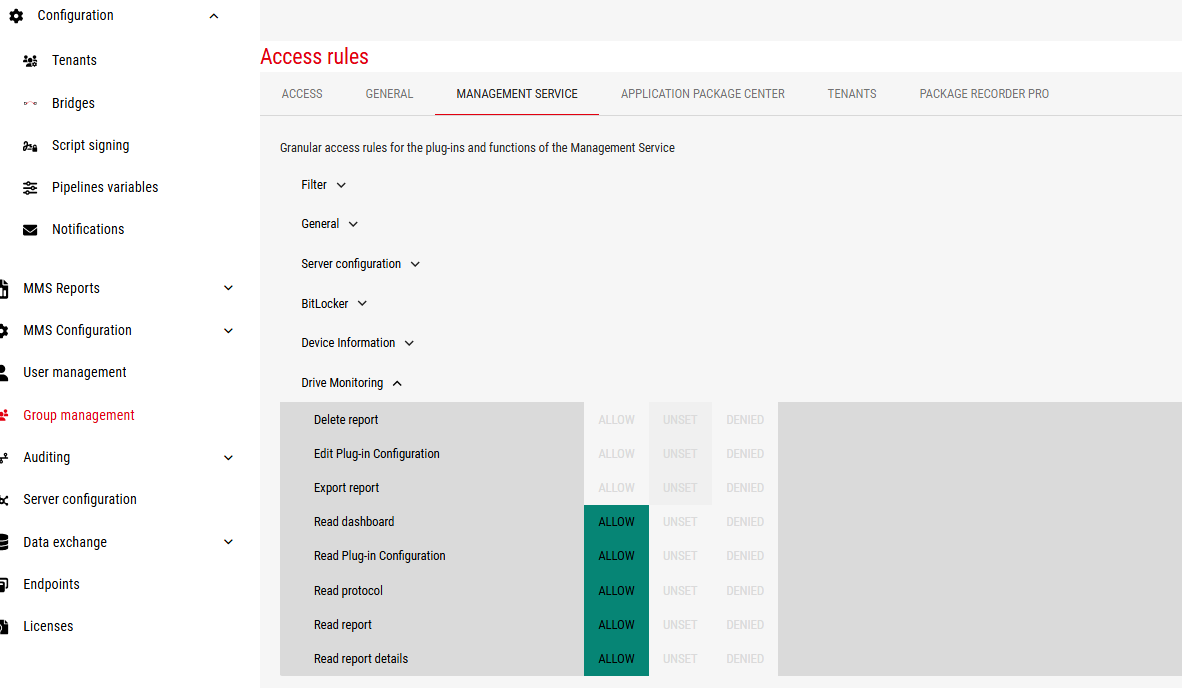
Ohne Anmeldung wird es nicht gehen, aber dafür gibt es die Reporter-Gruppe mit eingeschränkten Berechtigungen:
Hi,
danke für die Rückmeldung.
Das Mit der Reporter Gruppe ist zwar toll, aber ich habe ja irgendwann ein Timeout und werde abgemeldet. Daher die Idee ob es eine URL gibt bzw wo man aktivieren kann, dass man eine Art Dashbaord bauen kann.
Das wäre nämlich manchmal ganz hilfreich 
Danke
Dann müsste man sich die Daten via API ziehen und sich irgendwie Live-Reports zusammenbauen.
Hi,
vielen dank für die Rückmeldung.
Ich arbeite das erste mal mit den Scripts.
Muss hier irgendwo irgendwas vorbereitet werden?
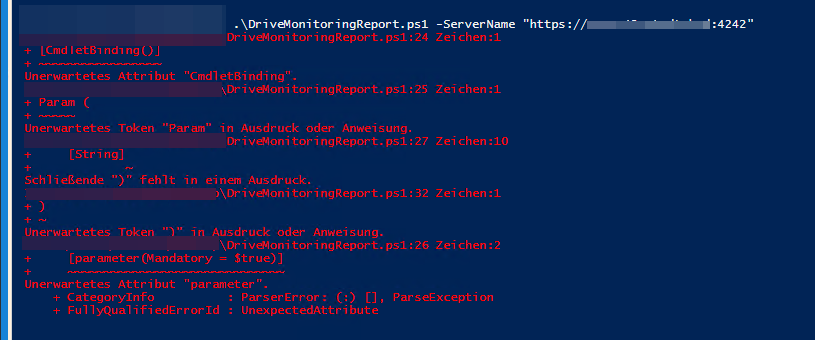
Weil wenn ich den Script abspeicher und mit dem Paramter -ServerName “https://servername.domaine:Port” starte erhalte ich Fehler:
Sieht mir nach einem Kopierfehler aus? Da fehlen ja irgendwelche Klammern.
Hinweis von MAN aus einem anderen Thread:
Um auf die API zugreifen zu können, muss der angemeldete Windows-Benutzer der das Skript ausführt Mitglied in der Gruppe „Neo42MgmtSvcAdmins“ (für alle APIs) oder „Neo42MgmtSvcReporter“ (nur lesend) sein.
Hi,
leider nein.
User ist in der Gruppe Reporter, es wird mir auch auf dem Desktop eine CSV angelegt ohne nur mit den Überschriften. ( und ja ein Rechner wäre unter dem Schwellenwert )
Kannst du dieses Skript mal testen?
#requires -version 4
<#
.SYNOPSIS
    Exports all Drive Monitoring Reports
.DESCRIPTION
    An example to show how to interact with the neo42 Management Service API
    to export values for all known clients from Drive Monitoring Reports to CSV.
.PARAMETER ServerName
    The server name of the neo42 Management Service.
.PARAMETER OutputPath
    The path where the CSV files should be stored.
    Defaults to the script root.
.OUTPUTS
    None
.NOTES
    Version: 1.2
    Author: neo42 GmbH
.EXAMPLE
    .\Export-DriveMonitoringReports.ps1 -ServerName "https://server.domain:4242"
#>
[CmdletBinding()]
Param (
    [Parameter(Mandatory = $true)]
    [string]$ServerName,
    [Parameter(Mandatory = $false)]
    [string]$OutputPath = $PSScriptRoot
)

[string]$filePath = Join-Path -Path $OutputPath -ChildPath 'DriveMonitoringReports.csv'
[string]$clientUrl = "$ServerName/api/client"
[string]$driveMonitoringReportUrl = "$ServerName/api/DriveMonitoringReport"

$headers = [System.Collections.Generic.Dictionary[[string],[string]]]::new()
$headers.Add('X-Neo42-Auth', 'Admin')

$clients = Invoke-RestMethod -Method Get -Uri $clientUrl -Headers $headers -UseDefaultCredentials -ErrorAction Stop
$rawreports = Invoke-RestMethod -Method Get -Uri $driveMonitoringReportUrl -Headers $headers -UseDefaultCredentials -ErrorAction Stop

# Use a hashtable with explicit Guid keys - REST API returns IDs as strings,
# so casting here ensures consistent key types for lookups
$reports = @{}
foreach ($report in $rawreports) {
    $reports[[System.Guid]$report.ClientId] = $report
}

$output = [Collections.Generic.List[System.Object]]::new()

foreach ($client in $clients) {
    $report = $reports[[System.Guid]$client.Id]
    if ($null -eq $report) {
        continue
    }

    [bool]$belowThreshold = $report.CurrentThresholdSize -le $report.VolumeInfos.'<Freespace>k__BackingField'

    $obj = [PSCustomObject]@{
        Client         = $client.NetBiosName
        ReportDate     = $report.CreationDate
        DeviceId       = $report.VolumeInfos.'<DeviceId>k__BackingField'
        VolumeName     = $report.VolumeInfos.'<VolumeName>k__BackingField'
        Freespace      = $report.VolumeInfos.'<Freespace>k__BackingField'
        Threshold      = $report.CurrentThresholdSize
        BelowThreshold = $belowThreshold
    }
    $output.Add($obj)
}

$output | Export-Csv -Path $filePath -NoClobber -NoTypeInformation -Encoding Default
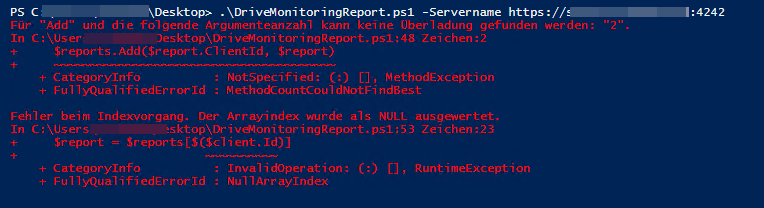
Geht leider auch nicht. Die Ausgabe ist aber zulange um Sie hier einzuzfügen. 
Aber ich habve sowas gefunden:
Aber grundlegend kann ich den Server in unserem DNS aufrufen sonst könnte ich ja auch nicht auf die APD Consoole ect.
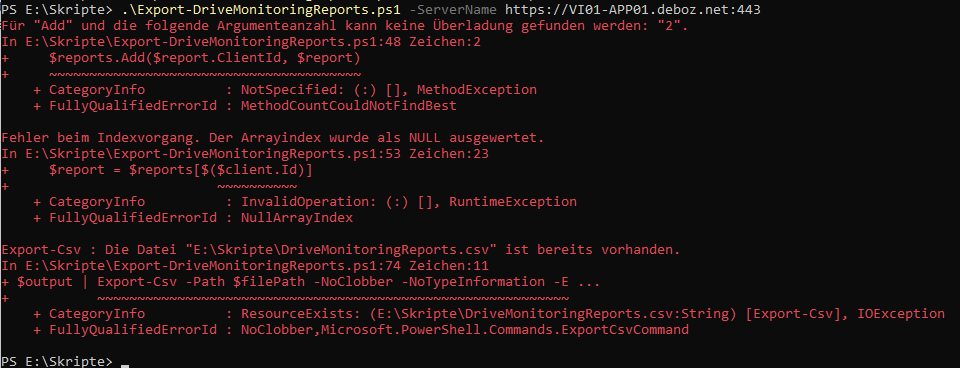
Ah, ich kann den Fehler nachstellen, wenn ich den falschen Port nutze:
Du musst den Port aus dem Serverkonfigurator nehmen.
Genau  sorry und danke.
Kann ich jetzt irgendwie in dem Pwoershell auf den Schwellwert begrenzen ?
Danke
#requires -version 4
<#
.SYNOPSIS
    Exports Drive Monitoring Reports for clients below the configured threshold.
.DESCRIPTION
    Queries the neo42 Management Service API for all drive monitoring reports
    and exports only the volume entries where free disk space falls below
    the configured threshold value to a CSV file.
    All size values are reported in GB and MB.
.PARAMETER ServerName
    The server URL of the neo42 Management Service (e.g. https://server.domain:4242).
.PARAMETER OutputPath
    The path where the CSV file should be stored. Defaults to the script root.
.OUTPUTS
    None
.NOTES
    Version: 1.1
    Author:  neo42 GmbH
.EXAMPLE
    .\Export-DriveMonitoringReportsBelowThreshold.ps1 -ServerName "https://server.domain:4242"
#>
[CmdletBinding()]
[OutputType([void])]
Param (
    [Parameter(Mandatory = $true)]
    [string]$ServerName,
    [Parameter(Mandatory = $false)]
    [string]$OutputPath = $PSScriptRoot
)

[string]$filePath = Join-Path -Path $OutputPath -ChildPath 'DriveMonitoringReportsBelowThreshold.csv'
[string]$clientUrl = "$ServerName/api/client"
[string]$driveMonitoringReportUrl = "$ServerName/api/DriveMonitoringReport"

[System.Collections.Generic.Dictionary[string, string]]$headers = [System.Collections.Generic.Dictionary[string, string]]::new()
$headers.Add('X-Neo42-Auth', 'Admin')

[array]$clients = Invoke-RestMethod -Method Get -Uri $clientUrl -Headers $headers -UseDefaultCredentials -ErrorAction Stop
[array]$rawReports = Invoke-RestMethod -Method Get -Uri $driveMonitoringReportUrl -Headers $headers -UseDefaultCredentials -ErrorAction Stop

# Build a lookup dictionary for fast client resolution by ID
[System.Collections.Generic.Dictionary[System.Guid, System.Object]]$clientLookup = [System.Collections.Generic.Dictionary[System.Guid, System.Object]]::new()
foreach ($client in $clients) {
    $clientLookup[[System.Guid]$client.Id] = $client
}

[System.Collections.Generic.List[pscustomobject]]$output = [System.Collections.Generic.List[pscustomobject]]::new()

foreach ($report in $rawReports) {
    [System.Object]$matchedClient = $null

    if (-not $clientLookup.TryGetValue([System.Guid]$report.ClientId, [ref]$matchedClient)) {
        Write-Warning -Message "No client found for ClientId '$($report.ClientId)' -- skipping."
        continue
    }

    # VolumeInfos is an array; check each volume entry individually
    foreach ($volumeInfo in $report.VolumeInfos) {
        [long]$freeSpaceBytes = $volumeInfo.'<Freespace>k__BackingField'
        [long]$thresholdBytes = $report.CurrentThresholdSize

        # Skip volumes that are NOT below the threshold
        if ($freeSpaceBytes -ge $thresholdBytes) {
            continue
        }

        [decimal]$freeSpaceGB = [math]::Round($freeSpaceBytes / 1GB, 2)
        [decimal]$freeSpaceMB = [math]::Round($freeSpaceBytes / 1MB, 2)
        [decimal]$thresholdGB = [math]::Round($thresholdBytes / 1GB, 2)
        [decimal]$thresholdMB = [math]::Round($thresholdBytes / 1MB, 2)

        $output.Add(
            [pscustomobject]@{
                Client        = $matchedClient.NetBiosName
                ReportDate    = $report.CreationDate
                DeviceId      = $volumeInfo.'<DeviceId>k__BackingField'
                VolumeName    = $volumeInfo.'<VolumeName>k__BackingField'
                FreeSpace_GB  = $freeSpaceGB
                FreeSpace_MB  = $freeSpaceMB
                Threshold_GB  = $thresholdGB
                Threshold_MB  = $thresholdMB
            }
        )
    }
}

if ($output.Count -eq 0) {
    Write-Host 'No volumes found below the configured threshold.'
    return
}

$output | Export-Csv -Path $filePath -NoTypeInformation -Encoding Default
Write-Host "Exported $($output.Count) record(s) to '$filePath'."
Das Skript exportiert dir Clients, welche unter dem Schwellenwert sind.